
Need a class that starts at the very beginning? We offer that!
What is a menu? Where do I find Print? When I Save, where does it go? What do you mean “Swipe?” or “Click?”
This is designed for adults of all ages: grandparents, university students, parents, new entrepreneurs if you need a specific digital skill to grow in your life, we will get your started.
You can start with Basic Digital Skills, where the first classes are defining vocabulary in the digital world and then move up to introductions to Word or Excel. Each class begins with the basic vocabulary for what you need to know to begin using the program. Class size is limited, so call us now! (If the class fills quickly, we will keep a waitlist and start another program if needed.)
Upcoming Classes
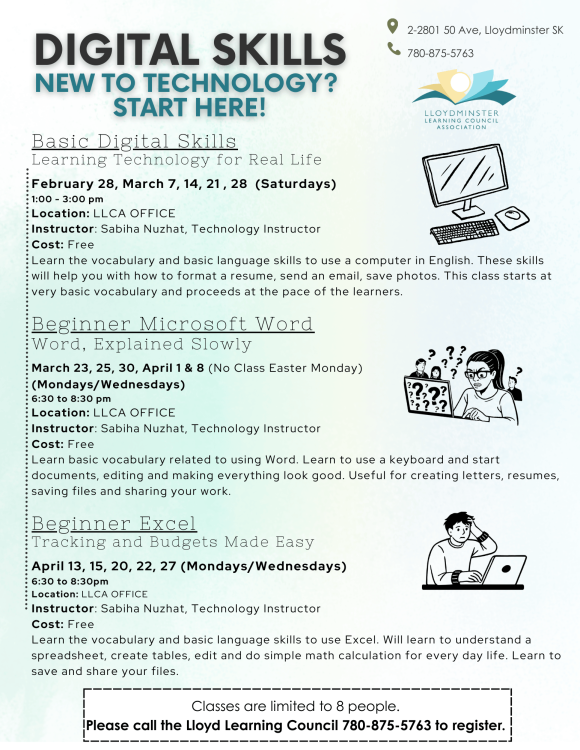
Register by calling us at 780-875-8763, or visit us at 2-2801 50th Ave, Lloydminster SK. We’re open for Registrations Monday to Thursday, 8:30am to 5:00pm
What will you learn?
Basic Digital Skills:
- getting comfortable with devices: learning all the basics
- finding information online safely: wi-fi vs data, search bar, reading search results and the basics of avoiding online scams
- staying in touch with email: how to use email, creating an account, writing messages, attachments, password basics
- using tech in daily life: online appointments, banking basics demo, government/health portals, shopping, maps, forms
- problem solving and independence: learn troubleshooting basics of common problems, internet issues, storage space, asking for help online
Beginner Microsoft Word:
- getting started and typing basics: parts of the keyboard, mouse and cursor, opening Word, blank documents, saving documents
- editing and fixing mistakes: highlighting and selecting text, cut/copy/paste, spellcheck
- making documents look good: font size and style, bold/italics/underline, line spacing, alignment, bullets, headings
- real life documents: letters, forms, simple resumes, lists, templates, saving different versions
- printing, sharing and review: print preview, printer settings, saving as PDF, attaching to email, cloud vs computer, troubleshooting
Beginner Excel:
- getting started with Excel: what Excel is used for, workbook vs worksheet, rows/columns/cells, cell addresses, entering text and numbers, saving
- editing and organizing data: edit vs overwrite, insert/delete rows, column width/row height, wrap text, borders, sorting
- formatting and simple calculations: number formats, bold/colour/highlight, = sign meaning, SUM function, Autofill, copy formulas
- real-life Excel uses: monthly budget, expense tracking, attendance lists, inventory, templates, file versions
- review, printing, sharing: print preview, page setup, print titles, save as PDF, email attachment, common errors
Call us at 780-875-5763 to register for one program, or for all of them!